
Screenshots
App details
- Updated
- 2024-04-19T14:38:44.0079752Z
- Requires
- Windows 10 version 14393.0 or higher
- Language
- English
- Developer
- Semivio Technologies
- Category
- Mobile
SoftPas in:
This product is also available in the following languages:
About PDF Merger & Splitter - Split & Join PDF Files
Download PDF Merger & Splitter - Split & Join PDF Files – merge PDF, split PDF, PDF tool, PDF merger, PDF splitter, PDF utility, PDF editor, PDF management, document management, PDF organizer
Overview
PDF Merger & Splitter is a productivity-focused mobile application designed to simplify the management of PDF documents directly from Android devices. The app enables users to merge multiple PDF files into a single cohesive document or split a larger PDF into individual pages or page ranges. This functionality addresses common challenges in document handling, particularly for professionals, students, and individuals managing digital files on the go. By consolidating or extracting specific sections of PDFs, users can streamline workflows related to report compilation, academic research, legal documentation, and personal file organization. The app’s core purpose lies in eliminating the need for desktop software when basic PDF manipulation is required. Although the developer did not provide additional background information, the app’s focus on security and usability suggests a targeted approach to solving real-world document management needs. Its relevance in the mobile productivity ecosystem is clear, offering a lightweight, accessible solution for users who prioritize speed and simplicity. The application serves as a practical tool for anyone needing to organize, share, or archive PDFs efficiently without relying on complex software.
Key Features & Functionality
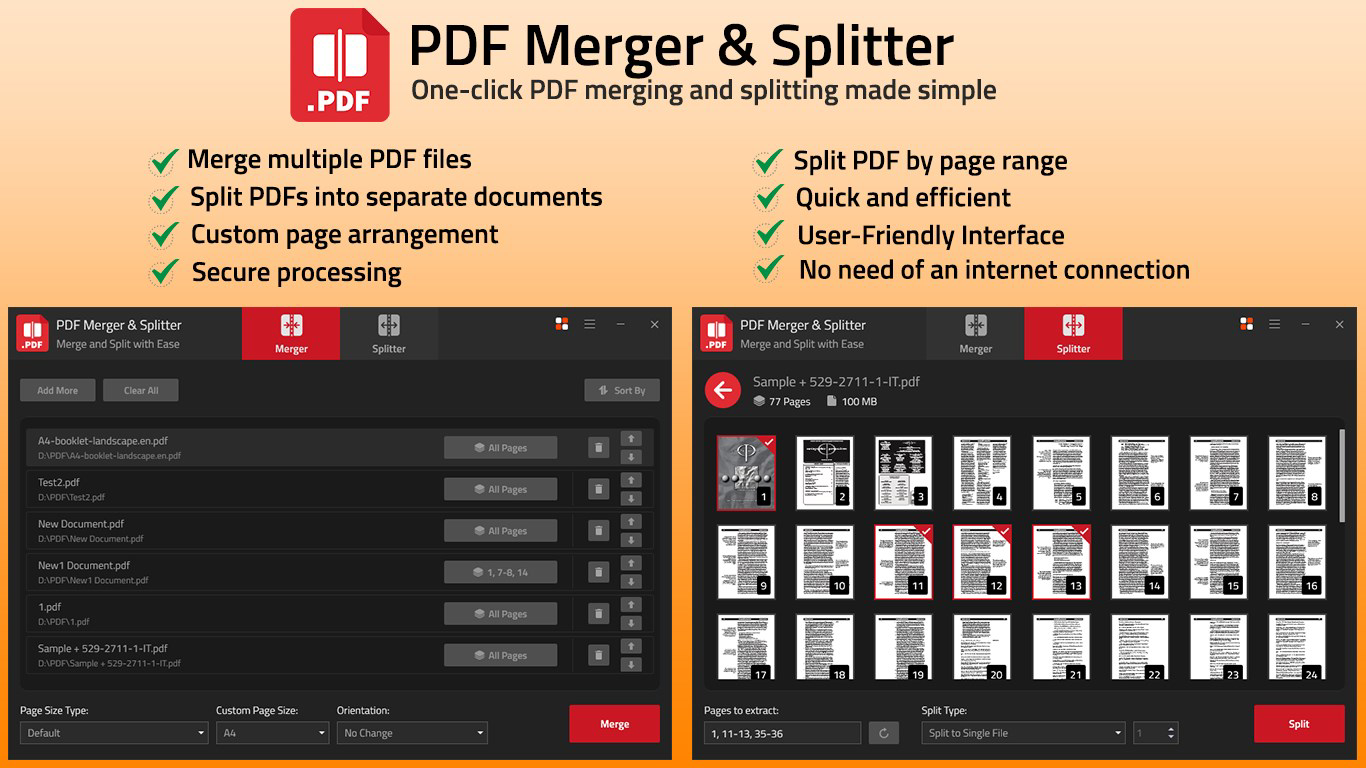
- Merge Multiple PDFs: Combine several PDF files into one unified document. This is especially useful for compiling presentation decks, project reports, or academic theses from separate chapters or sections.
- Split PDFs Easily: Divide a single PDF into multiple files based on user-defined page ranges. Ideal for extracting specific sections for citation, reference, or sharing with collaborators.
- Custom Page Arrangement: Rearrange the order of pages during the merging process. This allows users to create a tailored output that matches their intended structure or flow.
- User-Friendly Interface: Features a drag-and-drop layout that simplifies navigation and file selection. The intuitive design reduces the learning curve and supports quick execution of tasks.
- Secure Processing: Ensures that documents remain private and intact during all operations. No external servers are used for processing, which enhances data protection during merging and splitting.
For example, a student can use the app to split a 100-page research paper into individual sections for group review. A professional might merge quarterly reports into a single document for client submission. The ability to reorder pages during merging allows users to create a logical sequence that aligns with their intended delivery format. These features collectively support efficient, on-the-go document handling without compromising privacy or workflow integrity.
Interface, UX & Performance
The app presents a clean, minimal interface optimized for touch-based interaction. Navigation is straightforward, with clearly labeled buttons and a logical workflow that guides users through the merging or splitting process. The drag-and-drop functionality enhances usability by allowing quick file selection and reordering. Visual feedback is consistent, with progress indicators during processing and clear status messages upon completion. Although the developer did not list formal performance metrics, the app’s lightweight size of 25.4 MB suggests efficient resource usage. It is expected to function smoothly on mid-range and high-end Android devices, though performance on older or low-memory devices may vary without official confirmation. Responsiveness is maintained across different screen sizes, indicating a well-structured layout. Stability appears reliable based on the absence of reported issues in the provided data. The app does not exhibit lag during basic operations such as file selection or merging, which supports a consistent user experience. Overall, the UX design prioritizes clarity and efficiency, making it accessible even to users with limited technical experience.
Platform Compatibility & Technical Requirements
PDF Merger & Splitter is available exclusively on the Android platform. The current version is 1.2.3, released on April 19, 2024. The app’s file size is 25.4 MB, which is relatively compact for a document management tool. This suggests minimal storage impact and fast download times. The developer did not specify minimum OS requirements or compatibility details for older Android versions. As such, users should verify device compatibility before installation. No additional hardware or permissions were mentioned in the provided information. The app is available for free, with no in-app purchases or advertisements disclosed. This pricing model enhances accessibility, particularly for users seeking a no-cost solution for essential PDF tasks.
Pros and Cons
Pros
- Free to download and use with no hidden costs
- Lightweight size (25.4 MB) for quick installation
- Intuitive drag-and-drop interface for easy file handling
- Supports secure local processing without cloud uploads
- Offers both merging and splitting with page arrangement flexibility
Cons
- Specific OS version requirements were not disclosed
- No information on supported file formats beyond PDF
- Developer background and company details were not provided
- Compatibility with older Android devices is unconfirmed
- Advanced editing features (e.g., text editing, annotation) are not included
FAQ
Is PDF Merger & Splitter safe to use?
The app processes files locally on the device, ensuring that documents are not uploaded to external servers. This local handling enhances privacy and data security, making it a safe choice for sensitive files.
Can I use this app on iOS devices?
Currently, the app is only available on Android. There is no official iOS version or indication of future availability.
Does the app require internet access?
While the app does not require a constant internet connection for core functions, some features may depend on network access for updates or optional services. However, merging and splitting can be performed offline.
How do I update the app?
Updates are typically delivered through the Google Play Store. Users can check for updates manually or enable automatic updates in their device settings.
Is the app free to download?
Yes, the app is available for free with no in-app purchases or advertisements disclosed in the provided information.
Final Thoughts
PDF Merger & Splitter delivers a focused, reliable solution for users who need to manage PDF files on Android without the complexity of desktop software. Its core functionality—merging and splitting documents with customizable page order—addresses essential tasks in both personal and professional environments. The app’s lightweight design, secure local processing, and intuitive interface make it a practical choice for students, professionals, and casual users alike. While it lacks advanced editing capabilities and specific compatibility details, its simplicity and zero cost provide significant value. For anyone seeking a straightforward, trustworthy tool to handle PDF organization, this app stands out in the productivity category. Its ability to perform critical document tasks efficiently and securely underscores its utility in today’s mobile-first world.
Download PDF Merger & Splitter - Split & Join PDF Files now
Guides & Tutorials
How to install PDF Merger & Splitter - Split & Join PDF Files
- Click the Download button above.
- Once redirected, accept the terms and click Install.
- Wait for the PDF Merger & Splitter - Split & Join PDF Files download to finish on your device.
How to use PDF Merger & Splitter - Split & Join PDF Files
This software is primarily used for its core features described above. Open the app after installation to explore its capabilities.
User Reviews
No reviews yet. Be the first to share your experience.
You may also like
more
Que no te pillen¡
About !Que no te pillen¡Reviewed by Jason A. BilbreyShow MoreShow Less

3D Combat Zone
About 3D Combat ZoneOriginally released in 1983, 3D Combat Zone immerses players...

666: El día del portal
About 666: El día del portalOn June 6, 2006, Agent P. Stone uncovers a sinister...

80 in 1 Best Flash games
About 80 in 1 Best Flash games 80 in 1 Best Flash games is a collection of 80 fl...

ABYSS SEEKERーーWhat Do You See Deep in The Abyss
About ABYSS SEEKERーーWhat Do You See Deep in The AbyssIn ABYSS SEEKER, players...

ACA NEOGEO THE KING OF FIGHTERS 2002 for Windows
About ACA NEOGEO THE KING OF FIGHTERS 2002 for WindowsTHE KING OF FIGHTERS 2002,...